| Administering the ColdFusion Server |


|
|
Chapter 2 : Introduction to ColdFusion Server |
|
| Administering the ColdFusion Server |
|
|
Chapter 2 : Introduction to ColdFusion Server |
|
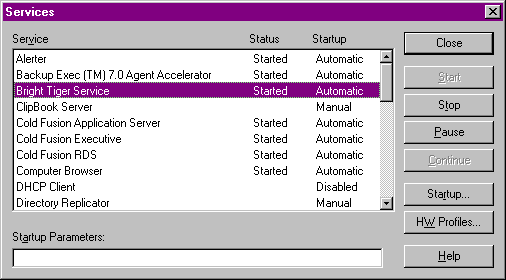
By default, ColdFusion employs four separate services under Windows NT. The following table explains the purpose of each one.
| ColdFusion Services on Windows NT | |
|---|---|
| Service | Purpose |
| Bright Tiger Service | Manages ColdFusion Server load-balancing and failover. For more information about clustering, which enables load-balancing and failover in ColdFusion, see Chapter 6, "Creating Scalable and Highly Available Web Sites". |
| ColdFusion Application Server | The main ColdFusion Server service. ColdFusion pages cannot be processed if this service is not running. |
| ColdFusion Executive | Polls the ColdFusion Application Server service and automatically restarts the ColdFusion Application Server if it is not running. |
| ColdFusion RDS | The ColdFusion Remote Development Service provides security, directory and file browsing, and debugging services for ColdFusion Studio. |
| SiteMinder Authentication Service | Only present if you chose the advanced security option during ColdFusion setup. Provides user authentication services for advanced security. |
| SiteMinder Authorization Service | Only present if you chose the advanced security option during ColdFusion setup. Provides access authorization services for advanced security. |
You can use the Windows NT Services Control Panel to view and manage these and other Windows NT services.
| Copyright © 1999, Allaire Corporation. All rights reserved. |
|